

Is it possible to get Facebook Business Page Likes without buying ads?
Many frustrated school marketers don’t think so.
You share great content day in and day out, use all the tactics and strategies you can think of to grow your fan base, yet you find your numbers are growing at a snail’s pace – or worse yet, you’re losing fans.
Perhaps things were different a few years ago. You were getting lots of new fans and likes, shares and comments, but over the last couple of years things have slowed down considerably.
Or maybe you’ve discovered that spending money on Facebook ads and paying for promoted posts has worked well, but it just isn’t sustainable to keep spending so much money.
What can you do to increase your Facebook fanbase without paying for ads or promoted posts? Here are some strategies to consider:
-
Focus on posts that are likely to get engagement
The very best way to increase engagement on your Facebook Page is to post content your fans will LOVE. When people love your content, they will comment on it and share it. What’s more, the Facebook algorithm will notice your increased engagement and will be more likely to give your posts more exposure on your fans’ pages.
Want ideas for what to post on your Facebook Page? Here are 53 things to post on your school’s Facebook Page.
-
Post video content
It’s no secret that video is tremendously popular on Facebook right now. Both live and recorded videos are great for getting view and shares, and ultimately increasing your fanbase. Facebook has stated that “posts that create meaningful interactions get more exposure in New Feed” and has indicated that live and recorded videos are excellent for facilitating interaction.
Want help creating videos for your school? Here are two articles that you might find helpful:
- How to Create Amazing Videos for Your School
- How to Make Good Marketing Videos Even If You’re Camera Shy
-
Use images with your posts
Many school marketers find this to be one of the easiest and most effective ways to increase your engagement and get more Page likes. Buffer analyzed 43 million Facebook posts and found that images get even more engagement than videos.
Parents love unfiltered photographs of their kids and what’s happening on campus on a daily basis. Funny, inspirational, educational and motivational posts with graphics are always popular. It’s easy to create any type of graphic you can think of using my favorite graphic design tool, Canva.
For more tools you can use to create and optimize graphics for social media, check out these articles:
- 10 Visual Marketing Tools to Help Your Social Media Stand Out
- 5 Best Types of Social Media Visuals for Schools
- How to Optimize Images for Better Web Design, Social Media and SEO
-
Consider posting more often
The Buffer Facebook study found that many brands report a positive increase in engagement when they post more often. However, some brands experienced the opposite. The top 20,000 Facebook Pages are publishing an average of 135 posts per month, which averages to 4-5 per day. Just make sure you are watching your analytics and making sure the additional effort is paying off in engagement. Note: only post more content if you have something really great to post.
-
Optimize your content for mobile consumption
More than 95 percent of Facebook users consume content using a mobile device, so it’s really important that your content be easily consumable on mobile. Things to consider include:
- Make sure you are using vertical video viewing because most people prefer to hold their phones in an upright position when viewing.
- Optimize your content by considering video length and caption length. Buzzsumo found that the optimal video length on Facebook is between 30 – 120 seconds, so keep your videos under 2 minutes. Caption length should be short (one sentence), and always include a video or image.
-
Use the Post Invite Button
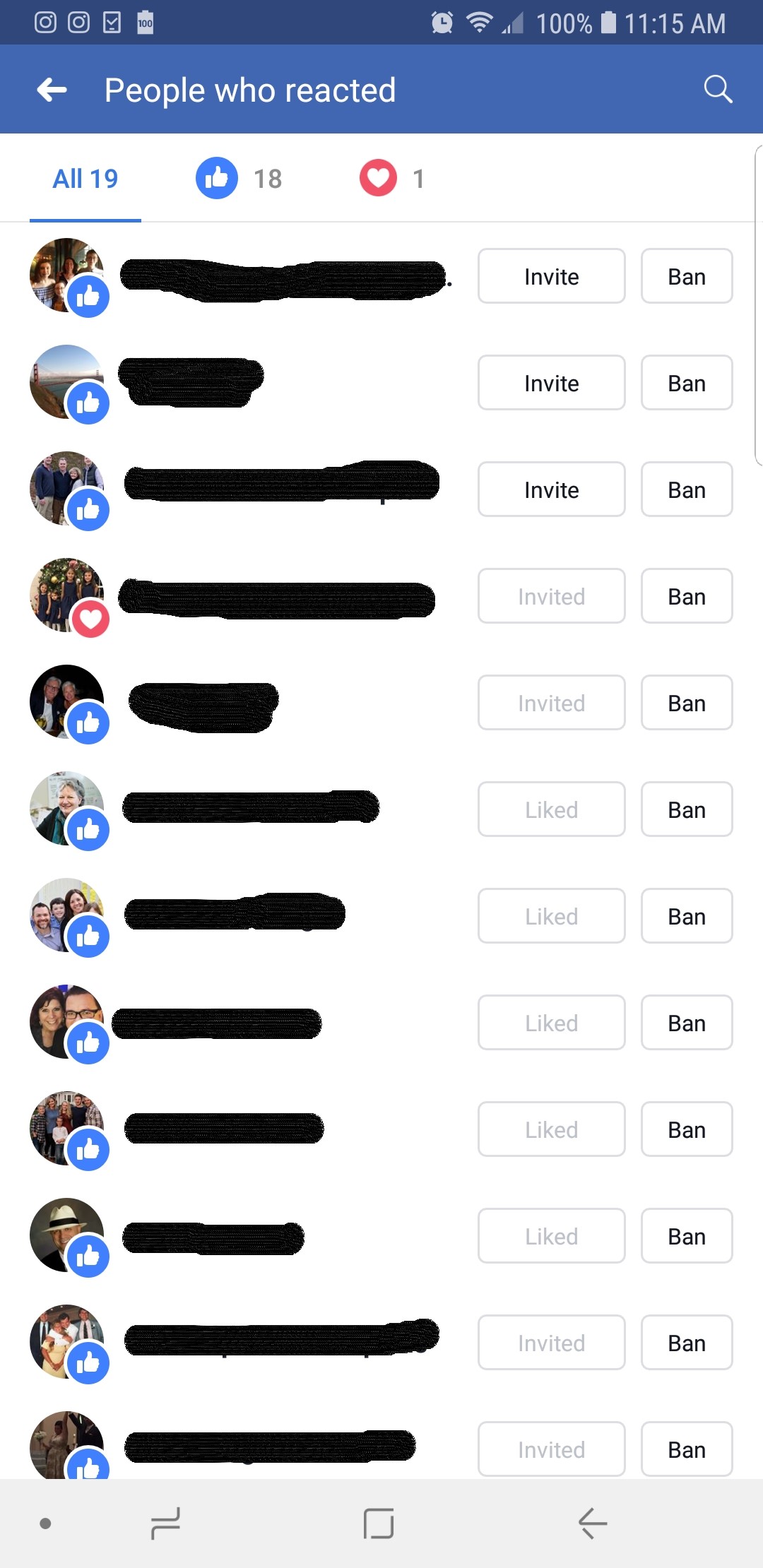
This is NOT he Invite Friends to Like Your Page button at the top of your page. This is a completely different button that is attached to people who have engaged with a post on your page.
Here’s how to access the Post Invite Button:
Using the regular Facebook App (not the Facebook Pages Manager), click on the people who have engaged with a post. You’ll see two types of buttons. One will say “Invite” or “Invited” (depending on whether you’ve already invited them to Like your Page) and you will see a Ban button to the right of the Invite/Invited button. I have found that about 15-20 percent of people will accept my invitation, which is a good return on the time it takes to Invite them.
-
Leverage your touch points
Take advantage of your other touch points, such as your newsletter, business card, and website. Make sure you have customized your Facebook page URL to be user-friendly, then add your Facebook page URL to your business card, marketing publications, email signature and make sure you use a Facebook Page widget to direct people to your Facebook page from your website.
I hope you find these tactics helpful as you plan out your Facebook marketing strategy for 2019. What are your thoughts about Facebook Marketing? Is your organic reach continuing to grow, stagnant or are you losing fans? I’d love to hear from you in the comments below.